# Create AI Chatbot item in Kuasa

<mark style="color:red;">**Note:**</mark> <mark style="color:red;"></mark><mark style="color:red;">Only one</mark> <mark style="color:red;"></mark><mark style="color:red;">**'AI Chatbot'**</mark> <mark style="color:red;"></mark><mark style="color:red;">item can be created per WhatsApp number.</mark>

1. Login to your Kuasa account via <https://campaigns.kuasa.io/>.
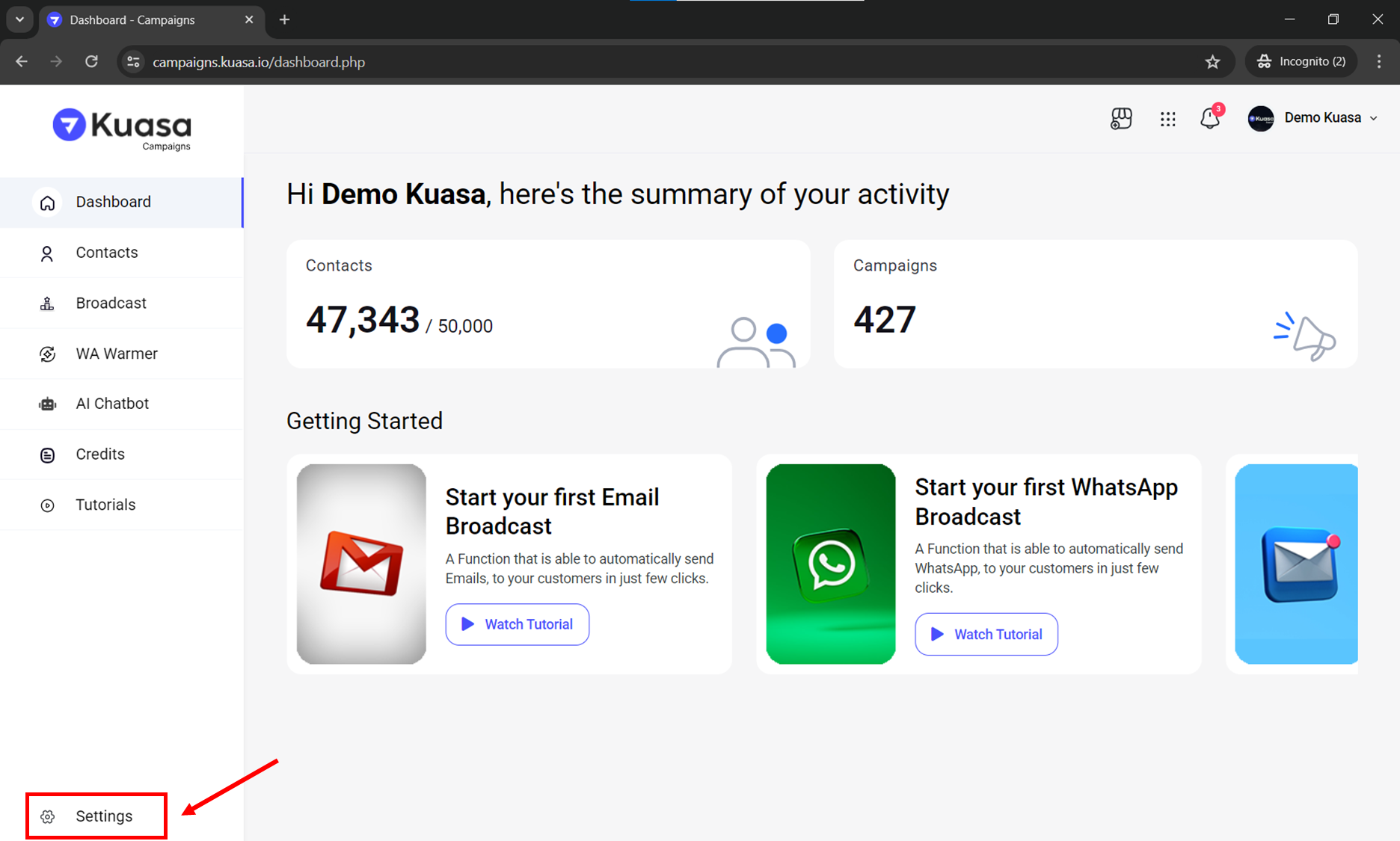
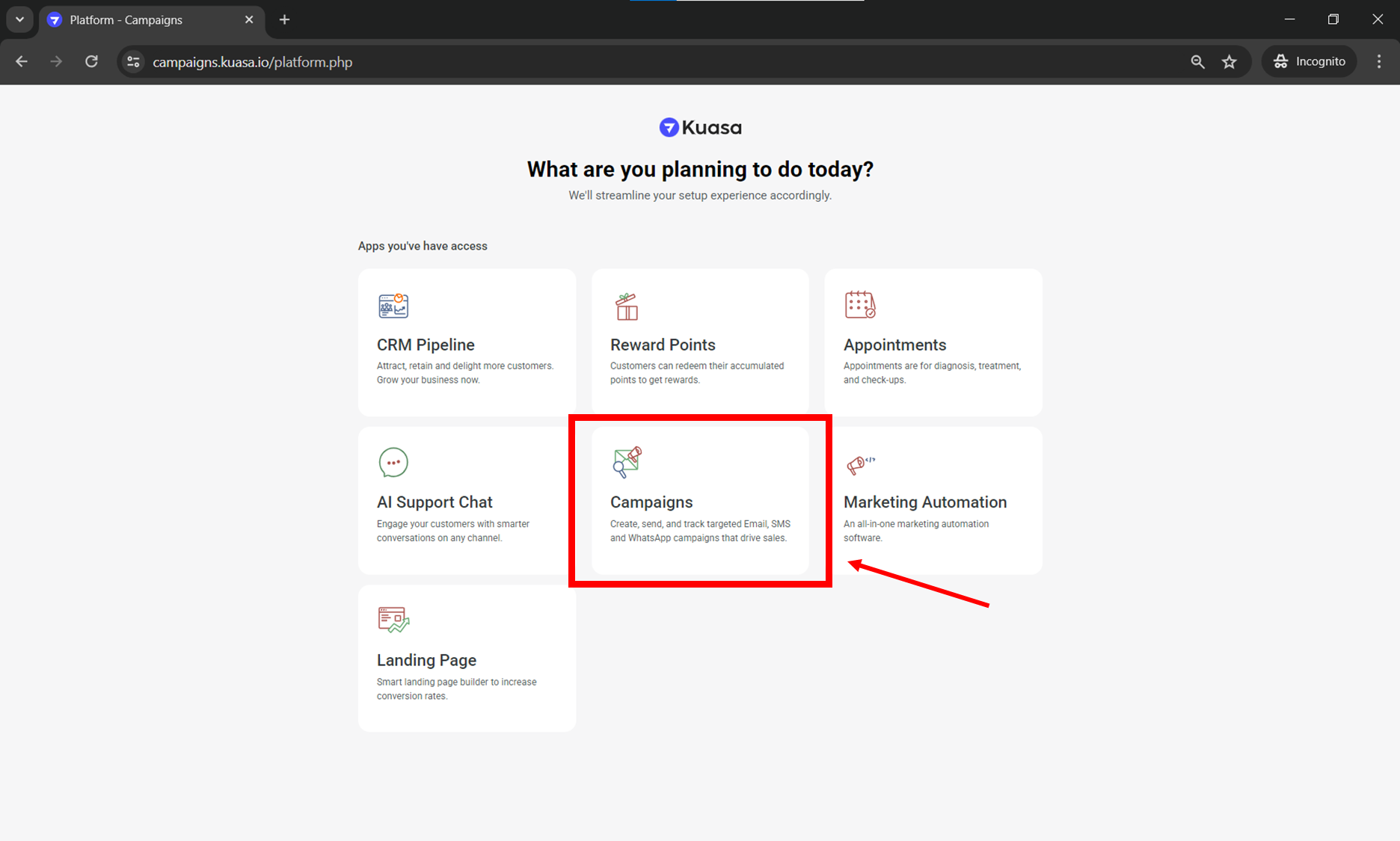
2. Click **Campaigns.**

<figure><img src="https://2425544693-files.gitbook.io/~/files/v0/b/gitbook-x-prod.appspot.com/o/spaces%2F3QW4viTMK6zDjbpEqP2H%2Fuploads%2FzISX5G5xsBompjfhJF2b%2Fimage.png?alt=media&#x26;token=7f4de021-af89-468a-99c5-388250f3dc0d" alt=""><figcaption></figcaption></figure>

3. Make sure that your WhatsApp device is connected to your Kuasa account. You may check the connection on your device settings.

<figure><img src="https://2425544693-files.gitbook.io/~/files/v0/b/gitbook-x-prod.appspot.com/o/spaces%2F3QW4viTMK6zDjbpEqP2H%2Fuploads%2FEjgaY77yELJlYPV1Lc2J%2Fimage.png?alt=media&#x26;token=53bebaac-ed45-45b9-aa21-b9f10340c502" alt=""><figcaption></figcaption></figure>

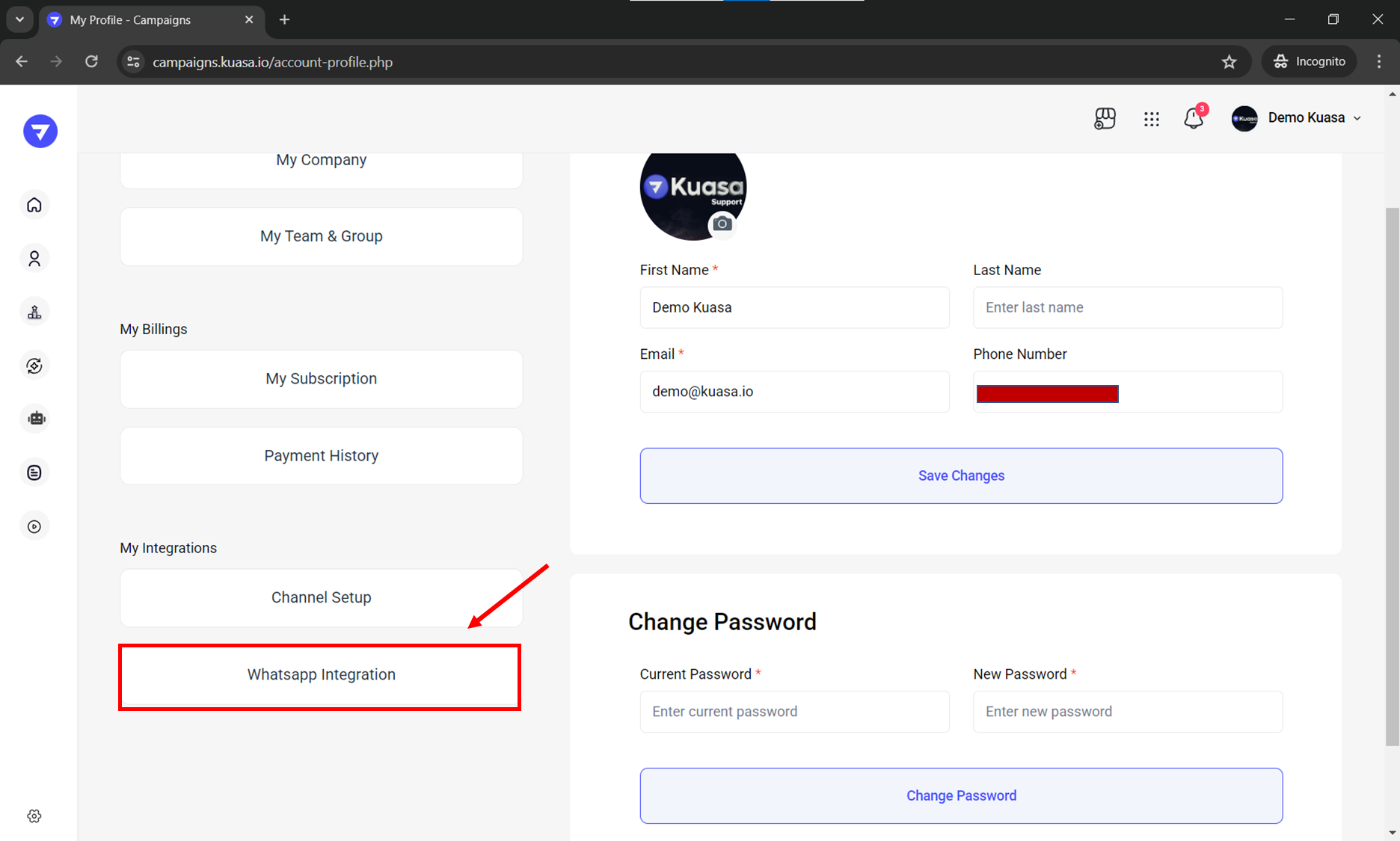
4. Click **WhatsApp Integration**.

<figure><img src="https://2425544693-files.gitbook.io/~/files/v0/b/gitbook-x-prod.appspot.com/o/spaces%2F3QW4viTMK6zDjbpEqP2H%2Fuploads%2FRTJHS8dsscZY9cpPqy8E%2Fimage.png?alt=media&#x26;token=4654579f-8994-43a4-ae0b-a505902eacf4" alt=""><figcaption></figcaption></figure>

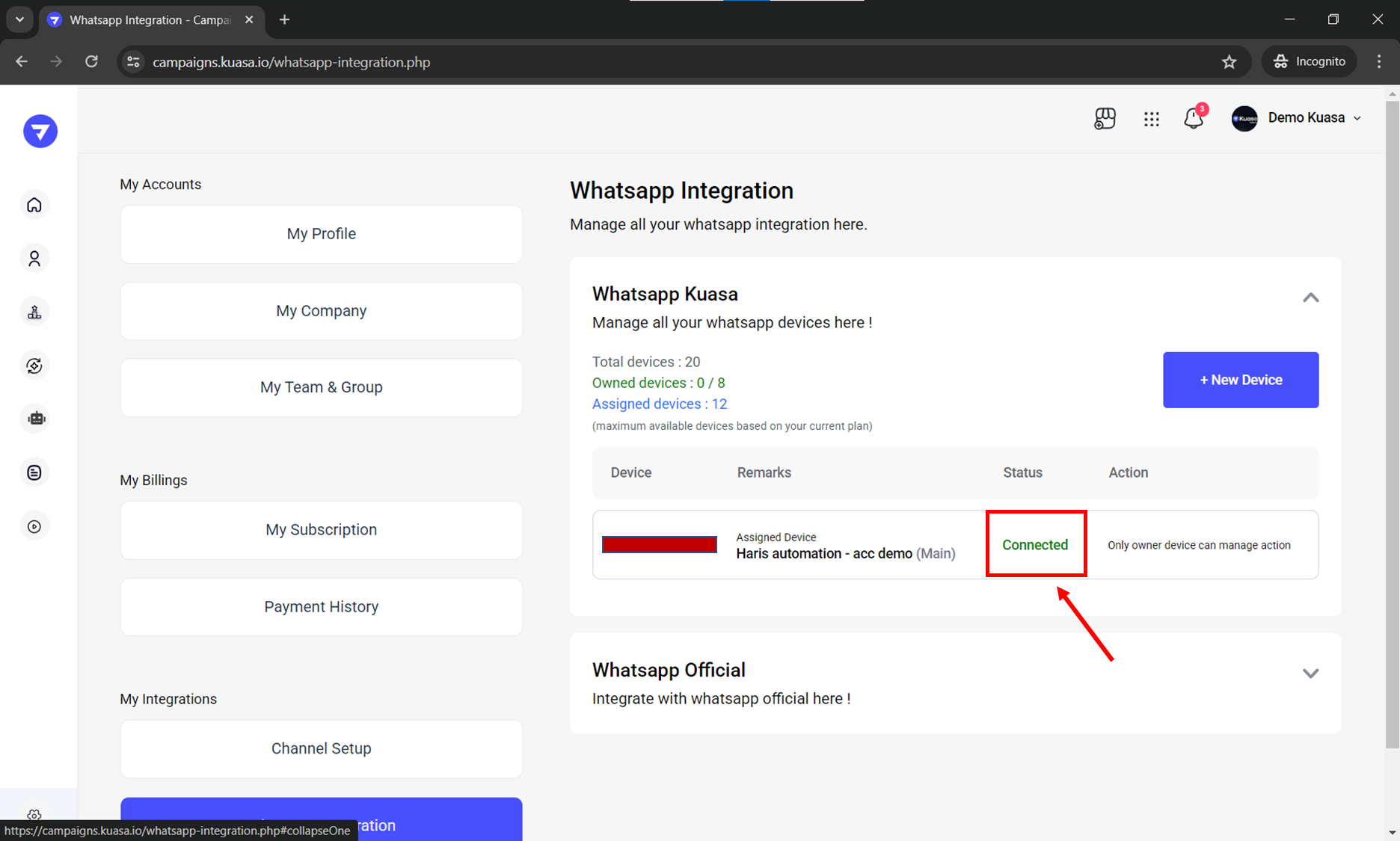
5. Make sure the connection is <mark style="color:green;">**Connected**</mark>.

<figure><img src="https://2425544693-files.gitbook.io/~/files/v0/b/gitbook-x-prod.appspot.com/o/spaces%2F3QW4viTMK6zDjbpEqP2H%2Fuploads%2FdljnKTJQjTTa2I6i2NOV%2Fimage.png?alt=media&#x26;token=ce675a76-4a0e-48a1-be12-d399c212a332" alt=""><figcaption></figcaption></figure>

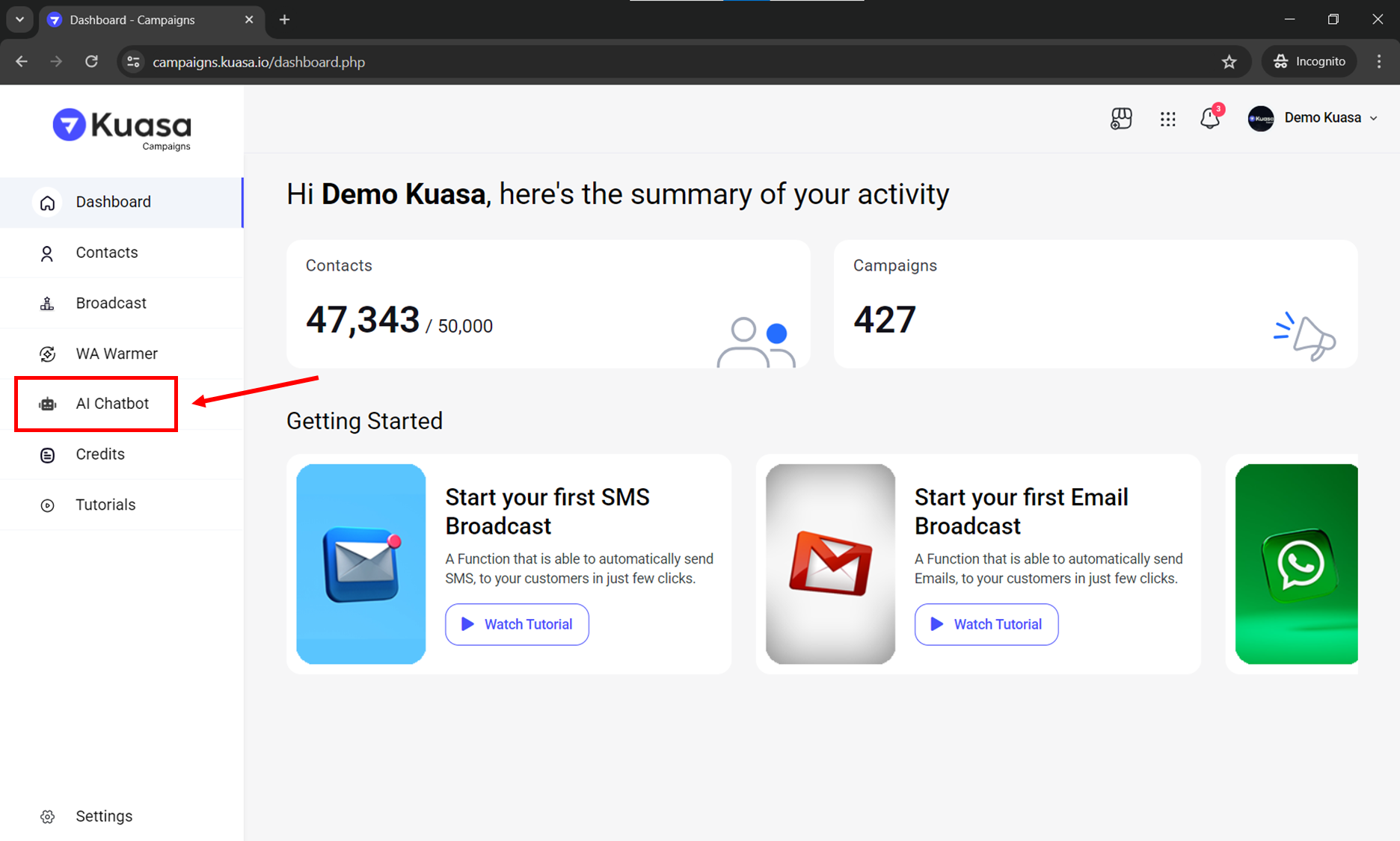
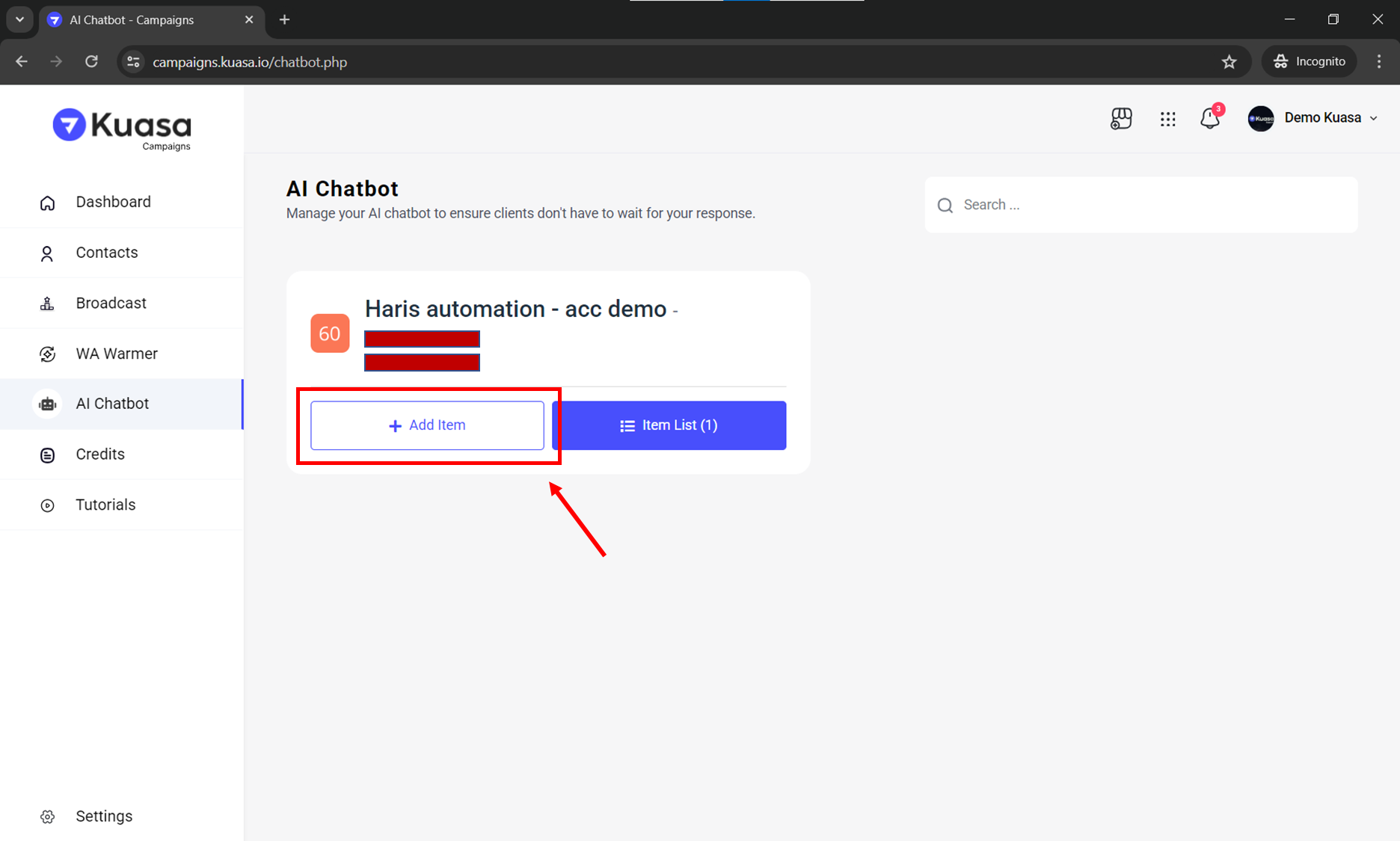
6. Click **AI Chatbot** on left side of your account.

<figure><img src="https://2425544693-files.gitbook.io/~/files/v0/b/gitbook-x-prod.appspot.com/o/spaces%2F3QW4viTMK6zDjbpEqP2H%2Fuploads%2F9XJesHVhla0EbRJiCetW%2Fimage.png?alt=media&#x26;token=32aab68b-e080-4c8b-bf4e-0edc2cf689a2" alt=""><figcaption></figcaption></figure>

7. Click **Add Item**.

<figure><img src="https://2425544693-files.gitbook.io/~/files/v0/b/gitbook-x-prod.appspot.com/o/spaces%2F3QW4viTMK6zDjbpEqP2H%2Fuploads%2FCQfnM2ANmQDTzccvnjUa%2Fimage.png?alt=media&#x26;token=2d012c3c-59fe-40ca-836a-31cfe36d9d37" alt=""><figcaption></figcaption></figure>

8. Choose **AI Chatbot.**

<figure><img src="https://2425544693-files.gitbook.io/~/files/v0/b/gitbook-x-prod.appspot.com/o/spaces%2F3QW4viTMK6zDjbpEqP2H%2Fuploads%2FwtTpi7q12XJCUK04IESt%2Fphoto_2025-09-19_16-11-171.jpg?alt=media&#x26;token=48d0f06b-8094-4317-9397-0961da4704d7" alt=""><figcaption></figcaption></figure>

9. Set up the details below:

<mark style="color:blue;">**A. Status:**</mark> Enable

<mark style="color:blue;">**B. Name:**</mark> Enter an item name for reference

<mark style="color:blue;">**C. Keyword to Start:**</mark> Any word from the customer that will activate your AI Chatbot

<mark style="color:blue;">**Keyword to Disable:**</mark> Any word from the customer that will stop your AI Chatbot

<mark style="color:blue;">**D. Presence Delay:**</mark> Set the response delay time

<mark style="color:blue;">**E. Prompt:**</mark> Enter the prompt for your AI Chatbot <mark style="color:red;">(All items and API keys will be lost if the device is deleted. Please save your API keys and prompts elsewhere as a backup.)</mark>

<figure><img src="https://2425544693-files.gitbook.io/~/files/v0/b/gitbook-x-prod.appspot.com/o/spaces%2F3QW4viTMK6zDjbpEqP2H%2Fuploads%2F7xe9YmBZZtW7U8bs4Daw%2Fphoto_2025-09-19_16-11-311.jpg?alt=media&#x26;token=2d9d1814-e294-4998-95fd-dd0e1bf0e1a0" alt=""><figcaption></figcaption></figure>

10. Click the **Add New** button.
11. Done! Your AI Chatbot item has been successfully added.
<figure><img src="https://2425544693-files.gitbook.io/~/files/v0/b/gitbook-x-prod.appspot.com/o/spaces%2F3QW4viTMK6zDjbpEqP2H%2Fuploads%2Fa4RUXYAgFfnpRp8WSKRZ%2Fphoto_2025-09-19_16-11-411.jpg?alt=media&#x26;token=593190b0-d7d0-4ae0-ab1e-663490235140" alt=""><figcaption></figcaption></figure>